
Fittiam journal · Working from home in Malta
If your working day begins at the kitchen table and ends with one last email on the sofa, your home may be doing several jobs at once. Finding a comfortable place to work can take a little thought — especially when you share the space or need to pack everything away before dinner.
You do not need a picture-perfect home office to make useful changes. Start by looking at three things: how your equipment fits you, how often you change position, and whether work has a clear finishing time.
This guide is for people working remotely or splitting their week between home and an office in Malta.
What does Maltese research tell us about working from home?
of participants reported musculoskeletal pain in a study of 459 teleworkers in Malta’s IT and communications sectors, published in 2023. The back, neck and shoulders were the most commonly affected areas.
This is a finding from a specific study sample, not a figure for everyone working from home in Malta.
The study also found associations between pain, working outside normal hours, exercising less frequently and higher levels of burnout. These findings do not prove that remote working caused the pain. They do, however, suggest that the working day deserves attention alongside the furniture. Source: University of Malta research repository
Rather than asking only, “Do I need a better chair?”, it is worth asking, “What happens during the hours I spend in it?”
Start with the part of your setup that makes work awkward
Before buying anything, notice what you repeatedly adjust.
Are you leaning towards small text? Reaching across the table for your mouse? Lifting your shoulders to type? These observations can help you identify what needs changing.
Separate your laptop screen from your typing position
A laptop’s screen and keyboard move together. Raising the screen also raises the keyboard, which can make typing awkward.
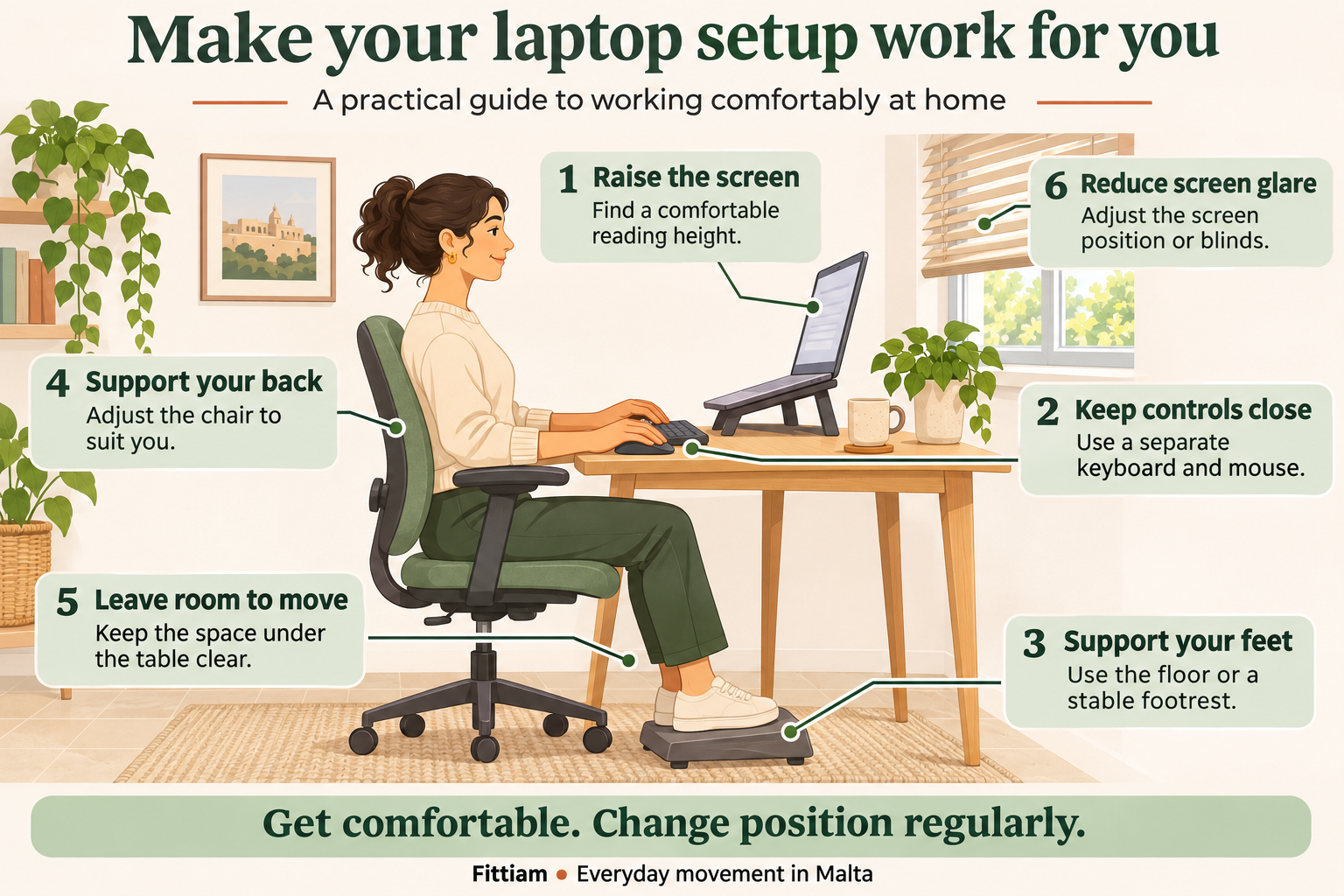
For longer working sessions, a separate keyboard and mouse let you position the screen independently. Use a stable stand and adjust the display so you can read comfortably without constantly looking down. Around eye level for the top of the screen is a useful starting point, rather than a position you must force yourself to maintain.
Keep the mouse close and enlarge text if you find yourself leaning forwards to read. These practical adjustments follow HSE guidance on working with display screen equipment.
Make the chair and table work together
An adjustable chair is useful, but it still needs to suit the height of your work surface.
Check that:
- Your feet have support from the floor or a footrest.
- You can sit back comfortably rather than perching on the edge.
- Your shoulders can relax while you type.
- There is enough space beneath the table to move your legs.
If the table is too high, changing the chair height may help — but check your foot support again afterwards.
Deal with reflections before changing how you sit
If daylight reflects across your screen, try adjusting its position or using blinds. Increase text size rather than moving closer whenever you need to read something.
The aim is to make the task easier to see and reach, so you have more freedom to sit comfortably.
Working at the dining table? Make setup a short daily routine
A shared table can be a practical workspace, but it helps to recreate a comfortable arrangement each morning.
Keep your keyboard, mouse and other small work items together in a box or bag. Before opening your inbox:
- Clear enough space for your equipment.
- Place the screen directly in front of you.
- Bring the keyboard and mouse within comfortable reach.
- Check your chair and foot support.
- Move bags and cables out of your leg space.
This is a suggested routine, not a medical prescription. Its purpose is to stop you spending the first half of the day adapting to wherever yesterday’s equipment happened to land.
If you regularly work from home and cannot make the available space comfortable, discuss the setup with your employer or a suitable workplace assessor. You do not have to work out every adjustment alone.
You do not need to hold a “perfect” posture
Trying to sit bolt upright all day can become another tiring task.
There is no single perfect posture that everyone needs to maintain. A position that feels comfortable initially may become less comfortable after a long stretch without movement. Changing position is reasonable; it does not mean you have failed to sit correctly.
You might sit back for a call, stand briefly between tasks, then return to a supported seated position for typing. The useful habit is giving yourself options.
For a broader explanation of sitting time and activity, read our guide to desk work in Malta and everyday movement.
Give movement a place in your calendar
At home, there may be fewer natural reasons to leave your chair. You no longer walk to a meeting room, speak to someone across the office or travel between home and work.
Create a few opportunities deliberately:
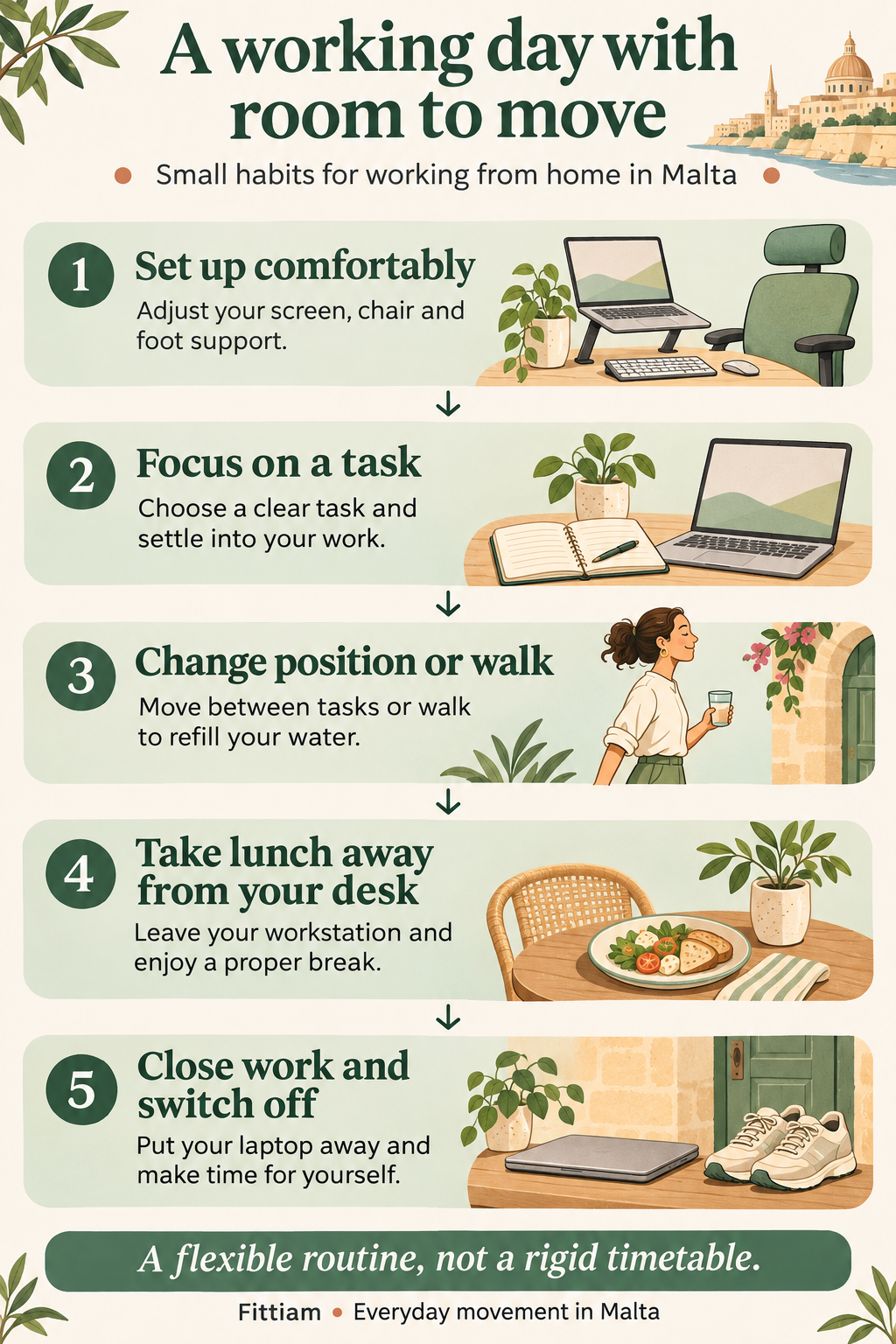
- Before the first call: take a short walk or spend a few minutes moving around at home.
- Between video meetings: leave a small gap to stand, walk and change position.
- When a task is finished: get up before starting the next one.
- At lunchtime: step away from the workstation rather than eating over the keyboard.
- After signing off: put work equipment away and begin a different activity.
These are examples to adapt, not targets you have to complete perfectly.
Short, regular changes of activity are a useful way to interrupt prolonged screen work. They are not a guaranteed method of preventing pain, and there is no single break schedule that suits every job.
If your diary is filled with consecutive meetings, discuss whether some can finish a few minutes earlier. A routine is easier to maintain when the workload allows room for it.
Plan outdoor movement around Malta’s heat
A lunchtime walk may fit your schedule in cooler weather, but it need not be your only option.
During hot periods in Malta, choose cooler parts of the day for outdoor activity, use shaded routes where possible and keep water available. Indoor movement in a comfortably cooled space is an alternative when conditions outside are unsuitable.
You could use a little of your former commuting time for an early walk, then take indoor movement breaks during the working day. Choose an arrangement that fits both the weather and your circumstances.
Make finishing work a visible action
When your workplace is a few steps from the sofa, “I’ll just check one thing” can quietly extend the day.
Consider a simple closing routine:
- Write down the next task for tomorrow.
- Close work applications.
- Put your laptop away if you use a shared space.
- Agree expectations about out-of-hours messages with your team.
- Move into an activity that marks the evening as your own.
A clear boundary will not solve every source of discomfort or work stress. It can, however, make it easier to protect time for movement, meals, rest and other people.
When should you get advice about pain?
Do not assume that every ache is simply part of working at a computer.
If back pain persists, worsens or affects everyday activities, seek advice from a qualified healthcare professional. For recurring neck or shoulder symptoms, personalised assessment may also be more useful than repeatedly changing equipment or trying stretches at random.
Stop exercises that make your pain worse. Back pain with new bladder or bowel changes, numbness around the genitals or anus, or weakness or numbness in both legs requires urgent medical assessment.
Frequently Asked Questions
Do I need a separate room to work comfortably from home?
No. A dedicated room may make it easier to separate work from home life, but the practical priorities are enough space, suitable equipment placement and the ability to change position. A shared space needs a setup you can recreate consistently.
Should I buy an expensive ergonomic chair first?
Not automatically. First identify what is difficult about your current arrangement. A chair will not resolve a screen that is hard to read or a mouse positioned too far away. Choose equipment for its fit and adjustability rather than its label or price alone.
Will a laptop stand help if I still use the built-in keyboard?
Raising the whole laptop may make the screen easier to see while leaving the keyboard awkward to reach. For sustained typing, a separate keyboard and mouse allow you to adjust the screen and your hands independently.
How often should I take a movement break?
Build in frequent opportunities to change activity rather than waiting for one long break. The timing should fit your work and individual needs. A reminder between tasks or meetings can be a practical starting point; no particular interval guarantees that you will avoid pain.
Does a movement break need to involve stretches?
No. Walking to another room or changing position also interrupts sitting. You do not need a complicated routine, and stretching should not involve pushing through pain.

How I can help you get moving
I’m Judit, and I offer personal and group training in Naxxar, Malta.
If you would like a regular opportunity to move outside the working day, you can explore my back-mobility classes with Pilates elements. If you prefer individual guidance, personal training gives us time to discuss your experience, goals and a suitable starting point.
You are welcome to begin as a complete beginner. If you have ongoing symptoms, let me know before joining so we can discuss suitability and whether healthcare advice is needed first. Exercise sessions do not replace medical assessment or treatment.